
1- Which accounting systems can directly integrate with Jisr?
Answer:
Odoo
SAP Business One
Oracle NetSuite
QuickBooks
Xero
Zoho Books
Microsoft Dynamics Finance
Microsoft Dynamics 365 - Business Central
Qoyod
SAP S/4HANA
Oracle Fusion
2- What are the configuration steps for activating the accounting integration?
Answer:
Mapping Subsidiaries.
Mapping Cost Centers.
Structuring the Chart of Accounts (COA).
Structuring the Journal Entry (JE).
Employee Distribution.
General Settings.
3- Who can activate the integration between the accounting system and Jisr HR?
Answer: A user with "System Admin" privileges or a custom role that possesses "Manage Integration and Applications" permissions.
4- Is there a fixed Chart of Accounts for all accounting systems during integration?
Answer: No, the Chart of Accounts is not fixed as it varies from one client to another based on the company's business activity and specific requirements.
5- Can more than one Chart of Accounts be added per cost center?
Answer: Yes, it is possible to add more than one Chart of Accounts for each cost center.
6- What are the supported versions for each system?
Answer:
Odoo: (V14, V15, V16, V17, V18, and Odoo 15 Enterprise Edition).
SAP Business One: Supports integration with SAP S/4HANA Cloud Editions.
Oracle NetSuite: NetSuite 2024 (latest), NetSuite 2023 (H1 & H2), NetSuite 2022 (H1 & H2).
QuickBooks: Cloud-based Online versions.
Xero: Xero API v2.
Zoho Books: API v3 (also works with previous versions down to v3).
Microsoft Dynamics Finance: Versions 10.0.30 through 10.0.38 (2024 Wave 1).
Microsoft Dynamics 365 - Business Central: Versions 22, 23, and 24 (2023 Wave 1 to 2024 Wave 1).
Qoyod: Basic, Pro, and Advanced.
SAP S/4HANA: Supports SAP S/4HANA Cloud Editions.
Oracle Fusion: Supported.
7- What data is transferred when the accounting integration is activated?
Answer:
Net Salaries & Entitlements: Total amounts due for payment.
Allowance Details: Separating each allowance (Housing, Transportation, etc.) to link it to its specific account in the COA.
Social Insurance (GOSI): The company's contribution as an "Expense" and the employee's contribution as a "Liability."
Deductions: Loans, penalties, or any other deductions for accounting settlement.
Employee Cost Allocation: Distributing costs across cost centers.
End of Service (EOS) Provisions: Monthly calculated amounts as future liabilities.
Leave Provisions: The value of accrued but unused vacation days, recorded as a financial liability in the balance sheet.
8- What Journal Entries (JEs) are exported from Jisr to the accounting system?
Answer:
Monthly Payroll.
Social Insurance Payables.
Ticket Provisions.
Final Settlement.
Leave & EOS Provisions.
Leased Labor Fees.
Leave Settlement.
Off-cycle Transactions.
9- In which accounting systems is adding subsidiaries mandatory? What is the "Cost Center" name in each?
Answer: Detailed in the specific system table which outlines systems requiring mandatory subsidiaries and their respective fixed cost center naming conventions.
10- Are payroll JEs sent to the accounting system immediately after integration?
Answer: No. The user must navigate to Payroll Reports in Jisr, click on "Journal Entries," and then select "Send" for the specific entry to be exported. Refer to the article: "Why must payroll be prepared and created first before completing the integration?"
11- What is the difference between "Grouping JEs by Cost Center" and "Selecting Cost Center Information"?
Answer:
Grouping by Cost Center: JEs will be consolidated based on the defined cost center (or payment method, e.g., all cash payments grouped together).
Selecting Cost Center Information: The specific cost center name (e.g., "Projects") will explicitly appear as a line-item detail within the Journal Entry.
12- Can the user view the entry in a detailed format?
Answer: Yes, the entry can be displayed as either "Detailed" or "Summary" based on user preference, configured under the "Journal Entry" tab in settings.
13- What are the client requirements for activating each system?
Answer: Requirements are displayed upon clicking the specific system name within the integration dashboard.
- Odoo
- SAP Business One
- Oracle NetSuite
- QuickBooks
- Xero
- Zoho Books
- Microsoft Dynamics Finance
- Microsoft Dynamics 365 - Business Central
- Qoyod
- SAP S/4HANA
- Oracle Fusion
14- Which accounts will be affected by financial transactions, and how?
Answer: Accounts mapped in the "Mapping COA" tab are affected. For example, if "Basic Salary" is linked to the "Basic Salary Expense" account in your accounting system, all employee basic salaries will post to that specific account.
15- Can more than one accounting system be integrating to a single Jisr account?
Answer: No, only one accounting system can be integrated per Jisr account. If Odoo is linked, you cannot link another system without disconnecting the first.
.
16- Can a custom Chart of Accounts be created?
Answer: Yes, but you must ensure all relevant employees are assigned to the custom COA to avoid errors where their entries fail to post.
17- Can a user assign different General Ledger (GL) accounts to different employee groups for the same transaction?
Answer: Yes, Jisr provides "Additional Charts of Accounts." You can have a Main COA (default) and create Additional COAs for specific groups (e.g., subsidiaries or specific cost centers). Transactions for these groups will map to the custom COA, while others revert to the main one.
18- Can employees be assigned to multiple cost centers within the same Dimension?
Answer: Currently, no. An employee can only be assigned to one cost center per dimension. Splitting across multiple cost centers simultaneously is a feature planned for future updates.
19- How can payroll be posted automatically every month?
Answer: Automated monthly posting is currently unavailable. Users must manually post JEs for confirmed payroll runs.
20- How can employee details be shown in Journal Entry line items?
Answer: If the accounting system supports employee sync:
Enable "Employee Information Sync" in settings (Auto-sync).
In "Journal Structure," enable "Show Cost Center Info" and select "View employee details at cost center level."
Select the transaction types for which you want details displayed.
21- How is leave accrual calculated in Jisr?
Answer:
Daily Accrual % = Employee Leave Balance ÷ Total Days in Year.
Monthly Accrual % = Daily Accrual % × Days in Month.
Daily Salary = Full Package ÷ Days in Month.
Leave Accrual Value = Daily Salary × Monthly Accrual %.
Note: The number of days in a month does not change the total value as daily salary and monthly % adjust proportionally.
22- Do changes made in the accounting system reflect back into Jisr?
Answer: No. Integration is generally one-way (Jisr to Accounting). All HR/Payroll changes must be made in Jisr to ensure they sync correctly to the accounting system.
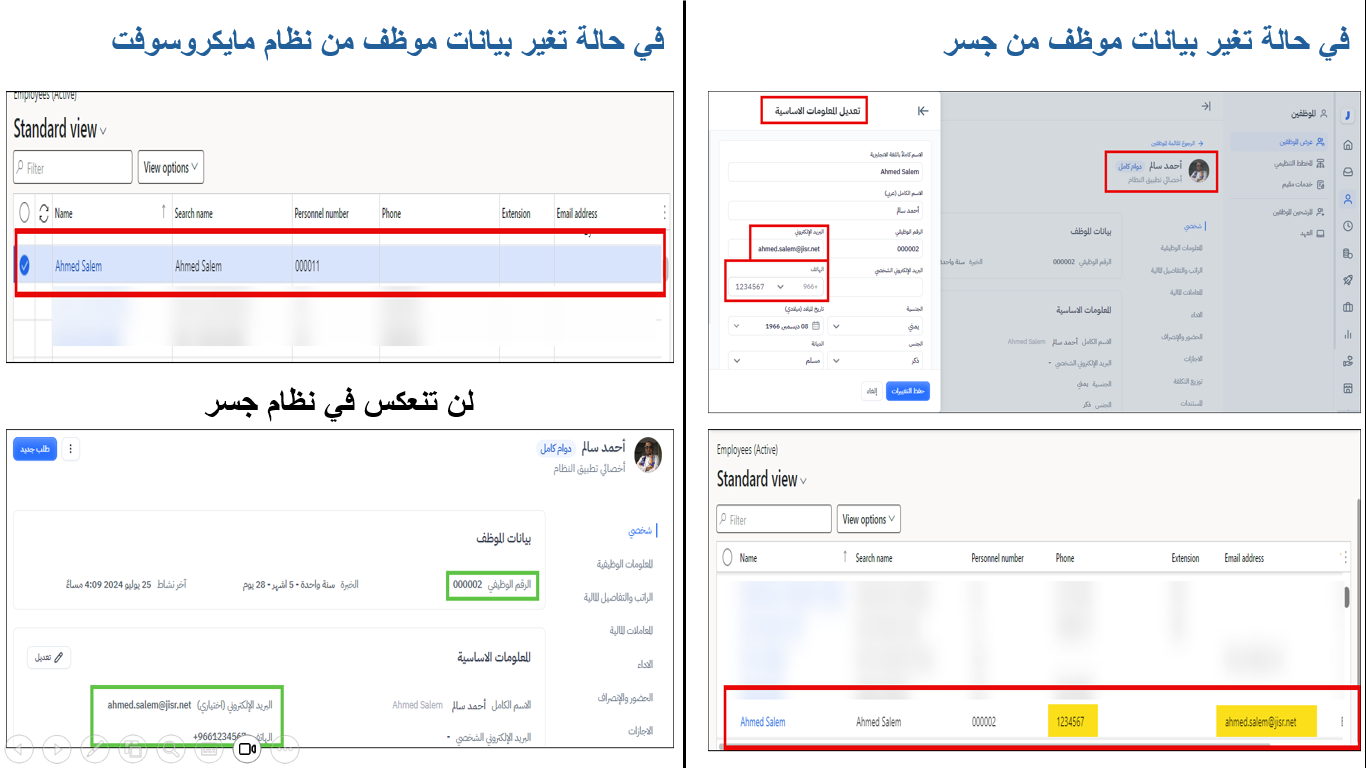
23- What employee information cannot be changed after integration?
Answer: The Employee ID (Employee Number). Changing it causes the accounting system to treat the employee as a "new record," leading to duplicates.
24- Can a company with branches (e.g., Jeddah branch with Al-Hamra and Al-Aziziyah sub-branches) define a specific COA for each?
Answer: Yes. If no custom COA is defined for a specific sub-branch, it will default to the COA of the parent subsidiary.
25- What are the requirements for File-based or OpenAPI integration?
Answer:
File-based: No specific requirements, provided no other system is already active.
OpenAPI:
1. Generate OpenAPI Key from Jisr.
2. Register key in the accounting system.
3. Technical requirements supported by the Jisr team.
26- What are the details of the integration mechanism between Jisr and NetSuite?
Answer:
| Type | Mechanism |
|---|---|
| Connection Type | One-way (from Jisr to NetSuite) via API. |
| Data Flow Direction | From Jisr to NetSuite. |
| Entry Types | Accrual Entries / Payment Entries (Coming Soon). |
| Data Type |
Creating Journal Entry files for:
• Monthly Payroll.
• Off-cycle Transactions.
• Annual Leave Settlements.
• Final Settlements.
• Monthly Leave Provisions.
• Monthly End-of-Service (EOS) Provisions.
• GOSI (Social Insurance) Payables.
• Leased Labor Fees.
• Creating an employee record in NetSuite when a new employee is added in Jisr.
• Syncing changes made to employee information from Jisr to NetSuite.
• Changing employee status to "Inactive" in NetSuite when their status changes in Jisr (Contract Termination).
• Deleting an employee record from NetSuite when the record is fully deleted from Jisr (Coming Soon). |
| Sync Mechanism | Manually when sending entries from Jisr to NetSuite, or automatically when the "Auto-Sync" option is enabled. |
| Flexibility |
• Supports multiple financial dimensions based on finance departments.
• Supports multiple companies/subsidiaries.
• Distribution of employee costs across multiple financial dimensions or subsidiaries (Coming Soon). |
27- When is an employee record created in NetSuite?
Answer: It depends on the configured settings. Jisr can create a record in NetSuite as soon as the employee file is created in Jisr, or based on the employee's status (Active/Inactive).
The most common triggers for creating a new record in NetSuite are:
When the employee record is created.
Upon the employee's joining date.
When employee information is updated in Jisr.
By default, the system starts syncing from the employee's joining date.
28- Will updates made to the employee file be synchronized?
Answer: Yes, provided that the "Sync Employee Information" option is enabled. Jisr will sync all employee data with NetSuite based on the following:
Adding a new employee in Jisr.
Making changes to employee information in Jisr.
Changing the employee status to "Inactive" in Jisr (Termination).
Deleting the entire employee record from Jisr (Coming Soon).
29- When can I input cost distribution (allocation) across multiple cost centers?
Answer: You can input cost distribution during the accounting integration setup process. You can also modify the percentages at any time, even after the integration between Jisr and your accounting system is complete.
30- Is there a condition for cost distribution percentages?
Answer: Yes, the total cost distribution percentage across all cost centers for a single employee must equal 100%. It cannot be more or less. If only one cost center is assigned, its percentage will automatically be 100%.
31- Can I edit cost distribution directly from the employee’s file?
Answer: Yes, you can. Go to "Employee Data," select the specific employee, and click on the "Cost Allocation" tab. From there, you can manually assign cost centers and customize the percentages.
32- What are the two main methods for handling leave settlements in Jisr?
Answer: There are two primary methods:
Salary-based Method (Default): Leave pay is considered part of regular salary expenses and does not affect the leave accrual balance on the balance sheet.
Accrual-based Method: Leave pay is considered a leave expense and is deducted directly from the employee’s accumulated leave accrual balance on the balance sheet.
33. Is the cost of the accounting integration or the Open API additional?
Answer: No, the accounting integration and the Open API service are included in the basic HR and payroll package at no extra charge.
34. Can an employee's salary be distributed across multiple cost centers?
Answer: Yes, you can allocate an employee's salary as a percentage (e.g., 40% to one department and 60% to another) through the "Employee Allocation" settings in the accounting integration. These percentages can be changed monthly.
35. Are new cost centers automatically reflected in the accounting system?
Answer: No, they are not automatically reflected. However, they appear in the options menu when a new cost center is added to the HR management system, allowing you to manually link them to the corresponding center.
Comments
0 comments
Please sign in to leave a comment.